

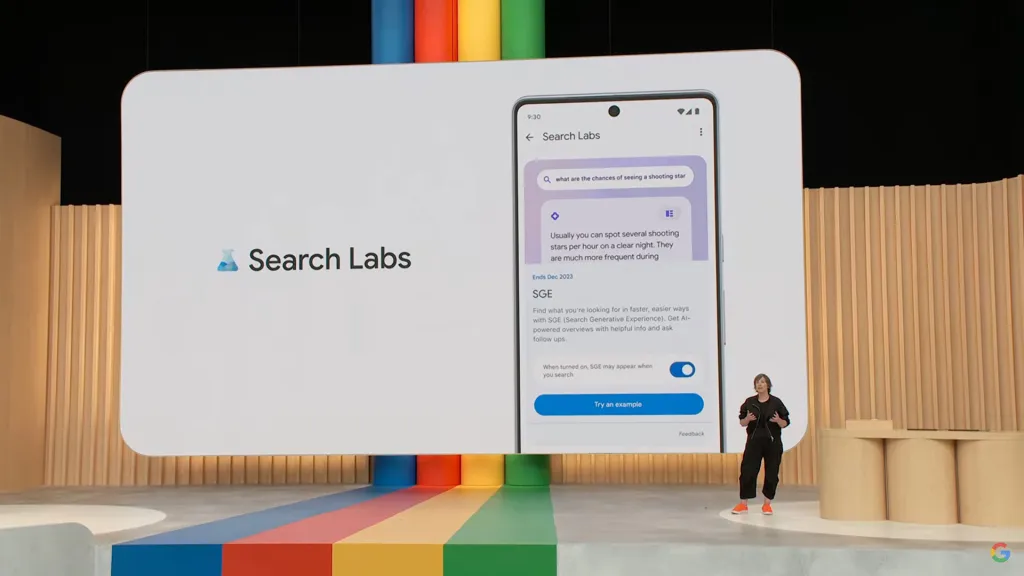
Google’s advancements in artificial intelligence (AI) have transformed the way people search and interact with information online. The integration of AI into Google’s search algorithms has introduced innovative features and capabilities, making search more intuitive, personalized, and efficient.
To fully leverage these advancements and enhance your search generative experience, it’s crucial to understand how Google AI works and how you can optimize its features to your advantage. This article provides a comprehensive guide on enhancing your search generative experience with Google AI.
Contents
Understanding Google AI and Its Role in Search
Google AI encompasses a range of machine learning and artificial intelligence technologies designed to improve search functionality and user experience. Some of the key components include:
Natural Language Processing (NLP)
- Contextual Understanding: Google AI uses NLP to understand the context and intent behind user queries. This allows the search engine to provide more relevant and accurate results based on the nuances of natural language.
- Semantic Search: NLP enables semantic search capabilities, which means Google can understand the meaning behind words and phrases, rather than just matching keywords.
Machine Learning and Algorithms
- Personalization: Google AI employs machine learning algorithms to personalize search results based on user behavior, preferences, and historical data. This helps in delivering results that are more aligned with individual interests.
- RankBrain: Google’s RankBrain is an AI-powered system that helps in interpreting complex queries and improving the relevance of search results.
Generative AI
- Content Generation: Generative AI models, such as Google’s BERT (Bidirectional Encoder Representations from Transformers), can generate content and provide answers to complex queries by synthesizing information from various sources.
- Enhanced Query Understanding: Generative AI helps in understanding and generating responses to queries that are conversational or open-ended.
Tips for Enhancing Your Search Experience with Google AI
To make the most of Google AI’s capabilities, consider the following tips to enhance your search experience:
1. Use Conversational Search Queries
Google AI’s natural language processing capabilities allow it to understand conversational queries better. Instead of using fragmented keywords, try phrasing your search queries in a natural, conversational manner. For example:
- Instead of: “best restaurants in Paris”
- Try: “What are the best restaurants to visit in Paris for a romantic dinner?”
Conversational queries help Google AI understand the context and intent of your search, leading to more relevant and accurate results.
2. Leverage Voice Search
Voice search is powered by Google AI’s speech recognition and NLP technologies. Using voice search can be particularly useful for hands-free searches and when you’re on the go. To optimize your voice search experience:
- Speak Clearly: Ensure that you speak clearly and at a moderate pace for better recognition.
- Ask Specific Questions: Voice search works best with specific questions. For example, instead of asking “weather,” ask “What is the weather forecast for New York City tomorrow?”
3. Personalize Your Search Experience
Google AI uses machine learning algorithms to personalize search results based on your previous interactions, preferences, and search history. To enhance personalization:
- Sign In to Your Google Account: Ensure you are signed in to your Google account to enable personalized search results.
- Manage Search Preferences: Customize your search preferences and settings to reflect your interests. This includes adjusting search filters, location settings, and content preferences.
4. Utilize Google’s Advanced Search Features
Google offers several advanced search features that leverage AI to provide more precise and relevant results:
- Search Operators: Use search operators (e.g., “site:”, “intitle:”, “inurl:”) to refine your search and get more targeted results.
- Google Lens: Use Google Lens to perform image-based searches. AI analyzes images to provide relevant information and context.
5. Explore Google’s Knowledge Graph
Google’s Knowledge Graph provides concise and relevant information on a wide range of topics. It leverages AI to understand the relationships between different pieces of information and present them in an easily digestible format. To enhance your search experience:
- Look for Knowledge Panels: Knowledge Panels appear on the right side of search results and offer summarized information about people, places, or things. Use this feature to quickly access key facts and details.
- Explore Related Topics: Click on related topics or links within the Knowledge Graph to discover more information and broaden your understanding.
6. Take Advantage of AI-Powered Features
Google’s AI-driven features can significantly enhance your search experience. Some notable features include:
- Featured Snippets: These provide direct answers to queries at the top of search results. They are generated by Google AI’s understanding of the content’s relevance and quality.
- Google’s AI Chatbots: Use AI chatbots for instant responses and assistance with common queries. These chatbots are designed to understand and generate human-like responses.
7. Stay Updated with Google AI Developments
Google continually updates and refines its AI technologies. Staying informed about these developments can help you take advantage of new features and improvements:
- Follow Google’s Official Blog: Google’s official blog provides updates on new AI features, tools, and advancements.
- Explore Google AI Research: Google AI’s research publications and projects offer insights into the latest innovations and applications.
Best Practices for Utilizing Google AI in Your Search Strategy
To maximize the benefits of Google AI for your search needs, consider these best practices:
Be Specific and Contextual
- Provide Context: When searching for information, provide as much context as possible. This helps Google AI understand the specific details and nuances of your query.
- Use Descriptive Language: Use descriptive and specific language to refine your search and get more accurate results.
Experiment with Different Query Formats
- Try Different Phrasings: Experiment with different ways of phrasing your queries to see how Google AI responds. This can help you find the most effective way to get the information you need.
- Use Variations: Use variations of keywords and queries to explore different angles and perspectives on the topic you’re searching for.
Provide Feedback
- Report Issues: If you encounter inaccurate or irrelevant results, provide feedback to Google. This helps improve the AI’s performance and ensures better results for future searches.
- Engage with AI Features: Actively engage with Google’s AI features and provide feedback on their effectiveness. This helps refine and enhance the tools you use.
Optimize Your Search Experience with Google AI
Google AI has revolutionized the search experience by offering more personalized, intuitive, and efficient ways to access information. By understanding and leveraging the capabilities of Google AI, you can enhance your search generative experience and achieve more accurate and relevant results.
From using conversational queries and voice search to exploring advanced features and staying updated with AI developments, these strategies will help you make the most of Google’s powerful AI technologies. Embrace these tools and techniques to optimize your search experience and stay ahead in the ever-evolving digital landscape.
