

Contents
3 Workable Ways to Backup and Restore WhatsApp
While changing your phone, the first thing that comes to your mind is how to back up and restore WhatsApp. Backing up and restoring WhatsApp ensures you don’t lose your chats, media, and other important data. However, if you don’t know the right methods, you won’t be able to transfer data to your new device correctly. In this article, we will tell you how to backup and restore WhatsApp using three simple methods.
Part 1. How to Backup and Restore WhatsApp via Google Drive
If you want to transfer WhatsApp from Android to Android, you can use Google Drive. It is a reliable app that allows you to back up all your WhatsApp data and restore it to a new device. However, this app only works for Android devices. Here is how you can backup and restore WhatsApp via Google Drive.
Backup:
1- Follow the steps below to back up WhatsApp to Google Drive.
2- Open your WhatsApp application and go to Settings > Chats > Chat backup.
3- Click the “Back up to Google Drive” option and choose your backup frequency, such as never, daily, weekly, monthly, etc.
4- Select the Google account where you want to backup your WhatsApp data.
5- Click “Back Up” to create an immediate backup.
Restore:
1- Once you have created your WhatsApp backup, follow the below steps to learn how to restore it from Google Drive.
2- Install WhatsApp on your new device and verify your phone number. Once done, click the “Next” option.
3- You will see the message “Backup Found,” so click the “Restore” option to download the backup.
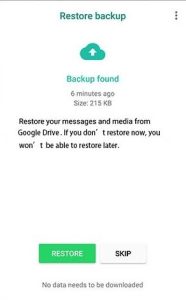
Once the process is completed, click “Next” and set up your new profile.
Following the above steps, you can backup and restore WhatsApp on your Android device. If you are an iPhone user, you can follow PART 2 where we have mentioned how to backup WhatsApp on iPhone.
Part 2. How to Backup and Restore WhatsApp via iCloud
iPhone users can try the iCloud app to backup and restore WhatsApp. This method allows you to seamlessly transfer your data to a new iPhone or restore it after a reset, ensuring you never lose important WhatsApp conversations. Let’s discuss how to backup WhatsApp on iPhone. After that, we will also tell you how to restore it.
Backup:
To backup WhatsApp on iPhone via iCloud, you can follow the below instructions:
1- Before using the WhatsApp app, ensure the iCloud option is enabled on your iPhone. To do so, launch the Settings app.
2- Click your name at the top to access Apple ID settings.
3- Now, choose iCloud and ensure both iCloud Drive and WhatsApp options are turned on.
4- Launch your WhatsApp app and click Settings > Chats > Chat Backup.
5- Tap “Back Up Now” to back up WhatsApp on your iCloud.
You can also turn on the “Include Videos” option to backup your WhatsApp videos.
Restore:
1- To restore the backup from iCloud, you can follow the following steps.
2- Install WhatsApp on your new iPhone and complete the verification process.
3- You will see the “Restore Chat History” on the screen, so click it.
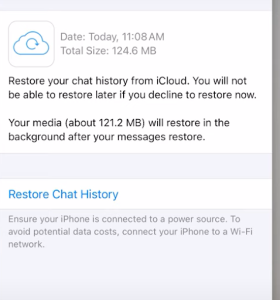
This option automatically restores your iCloud backup, including photos, messages, videos, and more.
These were the two official methods for backing up and restoring WhatsApp on Android and iPhone devices. If you want to use a third-party application to transfer data from Android to iPhone, continue reading.
Part 3. All-in-one Backup and Restore WhatsApp Using iToolab WatsGo
iToolab WatsGo WhatsApp Transfer is an all-in-one backup and restore WhatsApp tool that allows you to transfer WhatsApp data from Android to iPhone. It has a straightforward interface, making it a perfect option for newbies. The tool works with all your latest iOS and Android models.
What’s more, its transfer speed is three times faster than that of other tools. You can easily move over 20 data types without factory resetting your devices. Let’s discuss more about this software and the features it offers.
1. Backup Android and iPhone to PC
This app lets you quickly back up your Android and iPhone WhatsApp data to your PC. Yes, that is right. If your devices lack space, you can transfer all your files directly to your computer.
2. Save all Backup History
If you create multiple backup files, you will see a backup history list on your screen. You can now select which data you want to restore.
3. Restore any Older Backup Anytime
All your backup files will be saved on the app, so you can choose your older backup from the list and restore it according to your requirements.
4. Restore WhatsApp Backup from Android to iPhone, iPhone to Android, Android to Android, iPhone to iPhone
Google Drive and iCloud don’t allow you to transfer WhatsApp data directly from Android to iPhone because of differences between the operating systems. However, you can use iToolab WatsGo, which helps you restore WhatsApp backups from Android to iPhone, iPhone to Android, and so on. If you want to learn how to backup and restore WhatsApp from Android to iPhone, here are the steps that you can follow.
1- Launch the app and create the backup by clicking the “WhatsApp Backup” option.
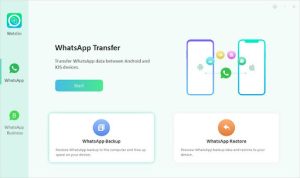
2- Connect your Android device with the PC and choose your device model.
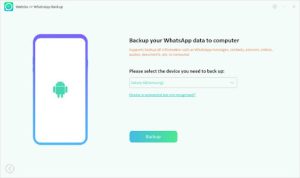
3- Enable end-to-end encrypted WhatsApp backup and verify it using the 64-bit password.
4- Once you have successfully backed up your data. Now, restore it by launching the app again. You can select the “WhatsApp Restore” option this time to restore your WhatsApp data to your iPhone.
5- Choose which backup you want to restore. And for that, you have to click the “Restore to Device” option.
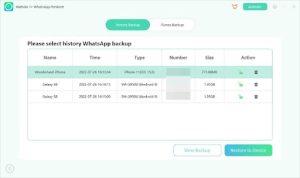
6- Connect your device, such as iPhone and choose the “Restore” option from the menu. Don’t forget to select which data you want to restore, such as photos, videos, voice notes and more.
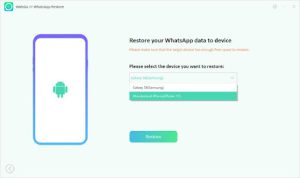
7- Soon, your data will be successfully transferred to your new device.
Conclusion
Throughout this guide, we have explored how to backup and restore WhatsApp using different applications. We have discussed iCloud and Google Drive methods for Android and iPhone users. However, if you want to backup and restore WhatsApp data from Android to iPhone, you should use the iToolab WatsGo, because it simplifies the process by offering a seamless cross-platform transfer. This software allows you to transfer all your WhatsApp data, including chats, media, and attachments, without compatibility issues or data loss.
