

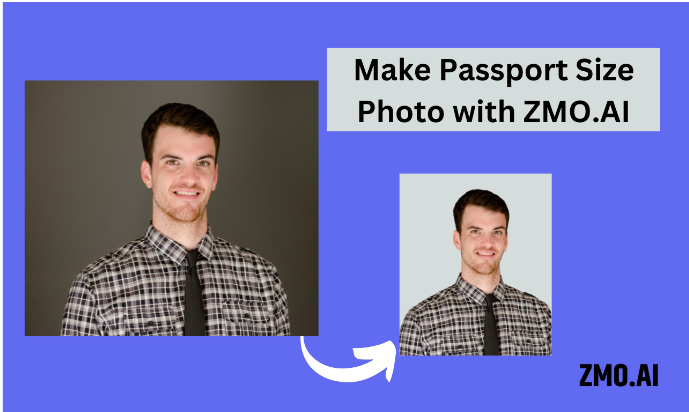
Passport size photos are required for various purposes, such as applying for a passport, visa, ID card, or driver’s license. However, getting a professional passport photo can be expensive, time-consuming, and inconvenient. You may have to visit a photo studio, wait in line, pay a fee, and hope that the photo meets the official standards.
But what if you could make your own passport size photos at home, using your smartphone or computer, and save money and hassle? In this article, I will show you how to do it in four easy steps, and also introduce you to three of the best passport size photo makers online, one of which is ZMO.AI imgcreator, a powerful AI photo editor that can create perfect passport photos in seconds.
Contents
Step 1: Find the location and get your camera
The first step is to find a suitable location and prepare your camera. Here are some tips to follow:
- Choose a place with good lighting, preferably natural light from a window or a lamp. Avoid direct sunlight, shadows, or glare on your face or background.
- Use a plain white or off-white background, such as a wall, a door, or a sheet. Make sure the background is smooth and uniform, without any patterns, textures, or objects.
- Use a tripod, a stand, or a friend to hold your camera. Do not take a selfie, as it can cause distortion and make your photo look unprofessional. The camera should be at eye level and about 1 meter (3 feet) away from you.
- Use a smartphone or a digital camera with a good resolution and quality. Avoid using a webcam, as it can produce low-quality images. Set the camera to the highest resolution and quality settings, and turn off any filters or effects.
Step 2: Take your own passport photo
The second step is to take your own passport photo, following the official guidelines for the country and document type you need. Here are some general rules to follow:
- Face the camera directly, with your head centered and your eyes open. Do not tilt or turn your head, or look away from the camera.
- Have a neutral facial expression, with your mouth closed and your eyebrows relaxed. Do not smile, frown, or make any other facial expressions.
- Remove any glasses, hats, headphones, or other accessories that cover your face or hair. If you wear glasses, make sure they do not have any glare or reflection on the lenses, and that they do not cover your eyes or eyebrows.
- Wear plain and simple clothing, preferably in a solid color that contrasts with the background. Avoid wearing white, as it can blend with the background. Do not wear any uniforms, costumes, or clothing with logos, slogans, or patterns.
- Take multiple photos with different lighting and angles, and choose the best one that meets the requirements. Check the photo for any problems, such as blurriness, red eyes, shadows, or glare.
Step 3: Crop the image and adjust the background
The third step is to crop the image and adjust the background, using an online passport size photo maker. There are many websites that offer this service, but I will recommend three of the best ones, based on their features, ease of use, and price.
ZMO.AI:
This is the best passport size photo maker online, as it uses artificial intelligence to create perfect passport photos in seconds. It can automatically remove the background and replace it with a white one, resize and crop the photo to the correct dimensions, and adjust the brightness, contrast, and color of the image. It also has a suit changer feature, which allows you to change your outfit to a formal one, without having to wear one. You can choose from a variety of styles and templates for men and women, and make your photo look more professional and attractive. ZMO.AI offers a free preview and an unbeatable price for purchase. You can download the photo as a PNG or JPG file, or print it on a standard paper size, such as 3×4, 4×4, 4×6, or A4.
IDPhoto4You:
This is another good passport size photo maker online, as it allows you to create your own passport photo for free. It lets you select the country and the photo type, and then upload your photo. It has a crop tool that helps you cut the image using a crop frame, and a preview tool that shows you how the photo will look like. It also has a guide that explains the requirements and tips for taking a passport photo. You can download the photo as a JPG file, or print it on a standard paper size, such as 4×6 or A4. Additionally, you have the option to custom order PVC ID cards, providing a durable and professional finish for your identification needs.
Fotor:
This is a popular online photo editor that also has a passport size photo maker feature. It offers three preset passport photo sizes: the standard US passport photo size of 2×2 inches, and two other common photo sizes of 30x40mm and 35x45mm. You can upload your photo and crop it to the desired size, and also edit it with various tools, such as brightness, contrast, color, and sharpness. You can download the photo as a JPG or PNG file, or print it on a standard paper size, such as 4×6 or A4.
Step 4: Download and/or print your DIY passport photo
The final step is to download and/or print your DIY passport photo, and use it for your application. Here are some tips to follow:
- Check the photo for any errors, such as incorrect size, format, or quality. Make sure the photo meets the official standards for the country and document type you need.
- Download the photo as a high-resolution and high-quality file, preferably in PNG format, as it preserves the image quality better than JPG format.
- Print the photo on a glossy or matte photo paper, using a photo printer or a digital photo lab. Do not use a regular printer or paper, as it can affect the quality and durability of the photo. Make sure the photo is printed in the correct size and without any borders or margins.
- Cut out the photo and staple it to your application form, or scan it and upload it to the online application system, depending on the requirements.
Conclusion
By following these four steps, you can make your own passport size photos at home, and save time and money. You can also use one of the best passport size photo makers online, such as ZMO.AI, IDPhoto4You, or Fotor, to crop and edit your photo easily and quickly. ZMO.AI is the best option, as it uses artificial intelligence to create perfect passport photos in seconds, and also has a suit changer feature that lets you change your outfit to a formal one. With these tools, you can create professional-looking passport photos that meet the official standards and impress the authorities.
